CASOON Open Source
Business PDFs from pure Rust.
lightweight-pdf builds invoices, quotes, reports and certificates from a fixed set of layout primitives – with its own PDF writer and TrueType subsetter, natively or as wasm32 inside a Cloudflare Worker.
cargo add lightweight-pdfcargo install lightweight-pdf-cli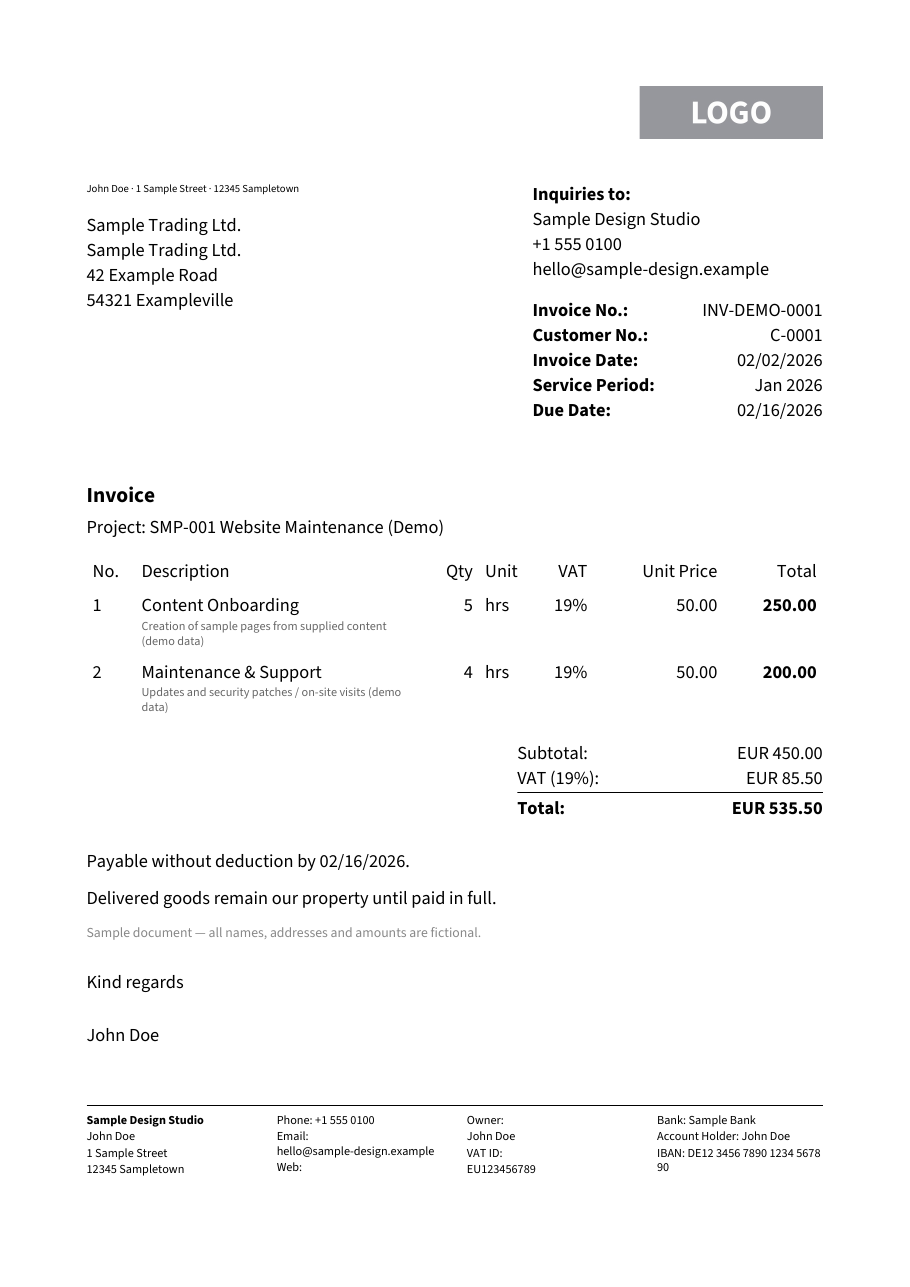
examples/demo_invoice.rs, rendered during this site's build · open the PDF (23.4 KiB)- required third-party dependency (skrifa, for font parsing)
- 1
- demo invoice PDF from this build, fonts subset and embedded
- 23.4 KiB
- gzipped WASM module with fonts, measured with wrangler
- 590 KiB
- per invoice, quote or report, native release build
- ~4 ms
What it does
Pagination handled for you
Two-pass layout keeps “Page X of Y” stable, splits tables across pages with a repeating header, honours widow/orphan rules and keep-with-next, and fills a table of contents with real page numbers.
Own writer, own subsetter
PDF objects, xref and streams are written by this repository, and only the glyphs a document uses are embedded. Streams are Flate-compressed by default; output is deterministic.
Built for the edge
The wasm32 build is part of CI and its gzip size is gated against a baseline. A Cloudflare Worker starter and a browser playground live in examples/.
JSON in, PDF out
Documents serialise to a versioned JSON format. Templates resolve {{placeholders}} and $each rows against a data file, and the lwpdf CLI renders both without Rust code.
Standards on request
PDF/A-3b, ZUGFeRD/Factur-X invoice embedding and Tagged PDF/PDF-UA-1, each behind a Cargo feature and checked with veraPDF.
Generated at build time
All examples →$ lwpdf validate examples/invoice-template.json --data examples/invoice-data.json ok: examples/invoice-template.json is valid $ lwpdf render examples/invoice-template.json --data examples/invoice-data.json -o invoice.pdf wrote invoice.pdf (10435 bytes)
Captured while this site was built: the lwpdf CLI validating and rendering the template from examples/. The PDF it wrote is in the showcase.
scripts/render-site-showcase.shQuickstart
Three steps from install to a first PDF. The full walkthrough lives in the documentation.
- Add the crate:
cargo add lightweight-pdf. - Build a
Documentfrom text, tables, rows, lists and images. - Call
render()and write the bytes wherever you need them – or skip Rust and render JSON withlwpdf.
use lightweight_pdf::*;

let mut doc = Document::new(PageFormat::A4)
    .margin(Margin::all(20.0))
    .footer(Footer::new(20.0, |ctx| {
        Text::new(format!("Page {} of {}", ctx.page, ctx.total_pages)).into()
    }));

doc.add(Text::new("Invoice").heading1());
doc.add(
    Table::new()
        .columns([TableColumn::flex(1.0), TableColumn::fixed(60.0).align(Align::End)])
        .header(["Item", "Amount"])
        .rows(vec![vec![Element::from("Consulting"), Element::from("1,200.00 USD")]]),
);

let bytes = doc.render().expect("render should succeed");
std::fs::write("invoice.pdf", bytes).unwrap();lwpdf render examples/invoice-template.json \
--data examples/invoice-data.json -o invoice.pdfNew in v0.3.0
Changelog →- PDF/A-3b output with
Document::pdf_a3b()(pdf-afeature), verified with veraPDF (#25). - ZUGFeRD/Factur-X invoice XML embedding with
Document::zugferd_xml()(zugferdfeature), verified with veraPDF and Mustang (#26). - Tagged PDF/PDF-UA-1 output with
Document::pdf_ua()(tagged-pdffeature), verified with veraPDF (#27). lwpdfcommand-line tool:render,validate,fontsandschema(#19).- Data-driven JSON templates with
{{placeholders}}and$each(#18). - JSON (de)serialisation of documents (
serdefeature) (#17).
Frequently asked questions
Does lightweight-pdf depend on a typesetting engine or a headless browser?
No. It has its own PDF writer (objects, xref, streams) and its own TrueType subsetter – the only required third-party dependency is skrifa, for font parsing.
Can it run at the edge, e.g. in a Cloudflare Worker?
Yes. The crate builds as wasm32-unknown-unknown, CI gates the gzipped WASM size against a baseline, and examples/ has a Cloudflare Worker starter plus a browser playground.
Do I need to write Rust to generate a PDF?
No. Documents can be plain JSON, and templates resolve {{placeholders}} and $each rows against a data file – the lwpdf CLI renders, validates and inspects both without any Rust code.
Does it support compliance formats like PDF/A or ZUGFeRD?
Yes: PDF/A-3b, ZUGFeRD/Factur-X invoice XML embedding, and Tagged PDF/PDF-UA-1 output are each behind a Cargo feature and verified with veraPDF (ZUGFeRD also with Mustang).
How does pagination work for long documents?
A two-pass layout keeps "Page X of Y" stable, splits tables across pages with a repeating header, honours widow/orphan and keep-with-next rules, and fills a table of contents with real page numbers.